
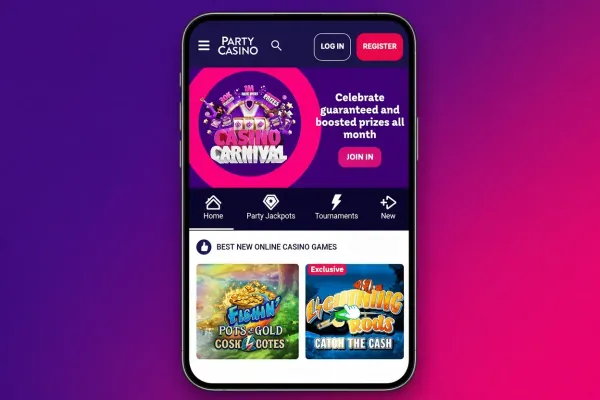

PartyCasino mobile is available three ways: through the mobile site in your phone's browser, through an iPhone app and through an Android app. The mobile site needs no download, so you can open PartyCasino in the browser of any phone, whether you use an iPhone or an Android handset.
If you prefer an app, the App page explains what is on offer, with separate guides for iPhone and Android. New players can create an account from the phone. The sections below cover what you can do on a phone, how to install an app and how to keep your account secure.
What you can do on a phone

The mobile site is the PartyCasino casino adapted to a smaller screen, so you reach it the same way you would on a computer: open the browser, go to the site and log in. New players can sign up from the phone itself, and the welcome bonus page covers the current offer for new accounts. T&Cs apply.
Games are the main reason to use mobile. You can browse slots, roulette, blackjack and live casino from a phone, and the games page shows what the casino offers.
A phone screen is smaller, and that is the main difference you will notice. Paytables, game rules and bonus terms take more scrolling, so give them time before you play. Read the conditions of any offer on the page before you accept it, and do not accept one just because the screen makes it quick to tap.
A phone suits shorter visits better than a desk does. You can check a game's rules, look at the paytable and read the terms of an offer wherever you are. It is a convenience, not a reason to play more often or for longer, and the same applies to the one-tap shortcut on your home screen.
The mobile site is also the simplest choice if you share a phone, use a work device or have little storage left. Nothing needs to be installed.
Playing in the browser or installing an app

You do not have to install anything. Open your browser, go to the PartyCasino site and log in. For one-tap access afterwards, your browser's Add to Home Screen option puts an icon on your home screen that opens the site directly. It behaves like a shortcut rather than an app.
If you would rather have an app, PartyCasino offers one for iPhone and one for Android. The iPhone app page covers the first, and on Android you can follow the steps on the Android page. Install apps only through your phone's app store or the steps given there, and never from a file or link sent by someone else. If a message, advert or website offers you an app file directly, leave it alone.
Before you install, ask yourself whether you need it. The app and the mobile site both give you PartyCasino on a phone, so the choice is a matter of preference. Some players like an icon that opens straight to the casino, while others prefer a browser they can close completely. Either is fine. The App page sets the options side by side.
You can start on the mobile site and add an app later if you like. To get started, you can visit PartyCasino from your phone.
Keeping your account secure on a phone

Lock your phone with a passcode or biometric lock, and do not leave the PartyCasino account logged in on a device other people use. If you share a phone or tablet, log out when you finish. Choose a password you do not use anywhere else.
A Wi-Fi connection you trust is a safer choice than a public network for logging in or making a deposit, and if you play on mobile data, check your allowance first.
Turn off lock-screen notifications for the browser or app if others might see your phone, and keep the phone's software up to date so that security fixes reach it. Log out after each visit on any device that is not yours alone.
Deposit limits and time-outs are the tools to set before you play rather than after, and the safer gambling page explains what each one does and how GAMSTOP fits in. Details on how to deposit are on the deposits page.